If you are shopping for an mb star c6 original unit and the price looks suspiciously low, there is a good reason to pause before clicking buy. The market for Mercedes-Benz diagnostic interfaces has been flooded with clone hardware that mimics the appearance of genuine tools while delivering unreliable performance, unstable software connections, and zero long-term support. This guide walks you through every layer of verification — physical, software, and performance — so you can confidently identify a genuine MB Star C6 VCI before spending your money.

Click the image to view this diagnostic tool
Why Counterfeit MB Star C6 Units Are Flooding the Market
The MB Star C6 is one of the most capable diagnostic interfaces available for Mercedes-Benz vehicles, supporting the DoIP (Diagnostics over Internet Protocol) communication standard that modern Mercedes models require. Because it bridges older K-line and CAN bus protocols alongside newer Ethernet-based DoIP communication, it has become the go-to tool for workshops handling a wide range of Mercedes passenger cars, vans, and light commercial vehicles. That broad appeal makes it an attractive target for counterfeiters.
Clone manufacturers have become increasingly sophisticated. Early fakes were easy to spot from across the room — poor plastic molding, misaligned logos, and obviously cheap cables. Today's clones often use the same outer shell dimensions, similar color schemes, and packaging that closely mimics genuine units. Some even include printed documentation that looks professional at first glance. The problem is that what is inside the housing rarely matches what a genuine mb star c6 doip interface contains in terms of component quality, firmware integrity, and communication reliability.
The financial incentive for counterfeiters is straightforward. A genuine MB Star C6 represents a meaningful investment for a professional workshop, and the price gap between authentic and clone units can be significant. Buyers who focus only on price without understanding what they are actually purchasing often end up with a tool that works inconsistently, fails during critical programming operations, or stops functioning entirely after a firmware update attempt. In a workshop environment, that kind of failure does not just waste money — it wastes billable hours and damages customer trust.
There is also a software ecosystem problem. The MB Star C6 is designed to work with Mercedes-Benz Xentry diagnostic software, and genuine units carry hardware identifiers that the software validates during activation. Clone units frequently use spoofed or recycled serial numbers, which means they may activate initially but fail during subsequent license checks or after Xentry updates. Understanding this dynamic is the first step toward making a safe purchase decision. For a broader look at how the C6 compares to previous Star diagnostic generations, see our MB Star C4 vs C5 vs C6: Full Comparison + DoIP Explained guide.
The rise of online marketplaces has made the problem worse. Listings from unverified sellers can appear alongside legitimate suppliers, and product photos are often copied directly from genuine product pages. A buyer who does not know what physical and software verification steps to take is essentially making a blind purchase. The sections below give you a structured approach to avoid that outcome.

Click the image to view this diagnostic tool
Physical Inspection Checklist: Markings, PCB Quality, and Packaging
Physical inspection is your first line of defense when evaluating whether a unit is a genuine Mercedes C6 VCI or a clone. While clones have improved in appearance, there are still consistent differences that a careful buyer can identify — especially if you know what to look for before the unit arrives and what questions to ask a supplier before purchase.
Housing and Build Quality
Genuine MB Star C6 units are built to workshop-grade standards. The housing plastic should feel solid and consistent, with no flex when you apply light pressure to the sides or top. Seams between housing panels should be tight and even, with no visible gaps or misalignment. Check that any ventilation slots or port openings are cleanly molded — rough edges or uneven cutouts are a common sign of lower-quality tooling used in clone production. The weight of the unit can also be a useful indicator, since genuine units tend to have more substantial internal components that contribute to overall weight.
Connector and Cable Quality
Inspect the OBD2 connector pins carefully. On genuine units, the pins should be uniformly plated, correctly spaced, and firmly seated in the connector housing. Bent, discolored, or loosely seated pins are a red flag. The USB and Ethernet cables supplied with the unit should have quality strain relief at both ends, and the connectors themselves should click firmly into place without wobble. Clone units frequently cut costs on cables, and a flimsy cable is not just an inconvenience — it can cause intermittent communication errors during live diagnostics or ECU programming sessions.
Labels, Markings, and Serial Numbers
Look for a clearly printed serial number label on the unit itself. The font, spacing, and print quality on genuine units are consistent and professional. If the label looks like it was printed on a standard office printer, applied crookedly, or uses a font that does not match across different label fields, treat that as a warning sign. The serial number on the physical label should normally match the serial number reported by the unit when connected to Xentry software. However, buyers should also understand the current market reality: original MB Star C6 units have been discontinued for several years, so many genuine units available today are pre-owned, refurbished, or sourced from previous workshop inventory rather than newly produced stock. In some cases, genuine units may have had the original serial number label removed or covered due to resale restrictions, channel protection, or previous ownership records. A missing or removed serial label does not automatically mean the unit is fake, but it does mean the buyer should verify the tool more carefully through hardware quality, Xentry behavior, DoIP stability, firmware support, and the supplier’s warranty policy.
At GETOBDTOOL, the genuine MB Star C6 units we supply may fall into this category: authentic hardware, but with the original serial number removed for resale and compliance reasons. That is why we recommend evaluating the whole unit rather than relying on the label alone.

Click the image to view this diagnostic tool
Software-Side Verification: Serial Numbers, License Checks, and Xentry Activation
Physical inspection tells you a lot, but software-side verification is where genuine and clone units most clearly diverge. The mb star c6 xentry integration is a critical part of what makes this tool valuable, and it is also the area where clones most frequently fail over time. Understanding how the software validation process works helps you ask the right questions before purchase and catch problems early after delivery. For a detailed walkthrough of the Xentry installation process, our Xentry Diagnostic Software on Windows 10: Install & Fix Errors guide covers the full setup and common error resolution steps.
Serial Number Validation in Xentry
When a genuine MB Star C6 is connected to a computer running Xentry, the software reads a hardware identifier from the VCI. This identifier is tied to the unit's licensing status. Genuine units will show a consistent, verifiable serial number that matches the physical label. Clone units often use duplicated serial numbers — the same number shared across multiple clone units produced in the same batch — or use numbers that were valid at one point but have since been flagged. If you have access to Xentry before finalizing a purchase, connecting the unit and checking whether the serial number validates cleanly is one of the most reliable verification steps available.
License Activation and Update Behavior
Genuine MB Star C6 units are designed to work within the Xentry licensing framework. When you attempt to activate or update the software, a genuine unit will complete the process without triggering license errors or requiring workarounds. Clone units frequently require modified or cracked versions of Xentry to function at all, and even then, they often fail after software updates because the update process includes additional hardware validation checks. If a seller tells you that you need to use a specific "offline" version of Xentry or that you should avoid updating the software, that is a strong indicator that the unit is not genuine.
Firmware Version and Update Support
Ask the supplier directly about firmware update support. A genuine mb star c6 original unit should be able to receive firmware updates through the standard update channel without requiring manual intervention or unofficial tools. Clone units are often locked to a specific firmware version because updating would overwrite the spoofed identifiers that allow them to function with modified software. If the supplier cannot clearly explain the update process or discourages you from updating, that is a meaningful red flag worth taking seriously.
If you are comparing the C6 to older interfaces, it is worth noting that the mb star c6 doip capability represents a genuine advancement over previous generations. Older tools like the C4 — sometimes referred to as the genuine mercedes c4 in workshop discussions — used different communication architectures and did not support the Ethernet-based DoIP protocol that newer Mercedes models require. For a detailed head-to-head breakdown, see our comparison of Mercedes C4 DoIP vs C6 VCI: Which Star Diagnostic Tool Wins?. A clone C6 that cannot reliably handle DoIP communication is not just a bad purchase — it is functionally useless for diagnosing current-generation Mercedes vehicles.
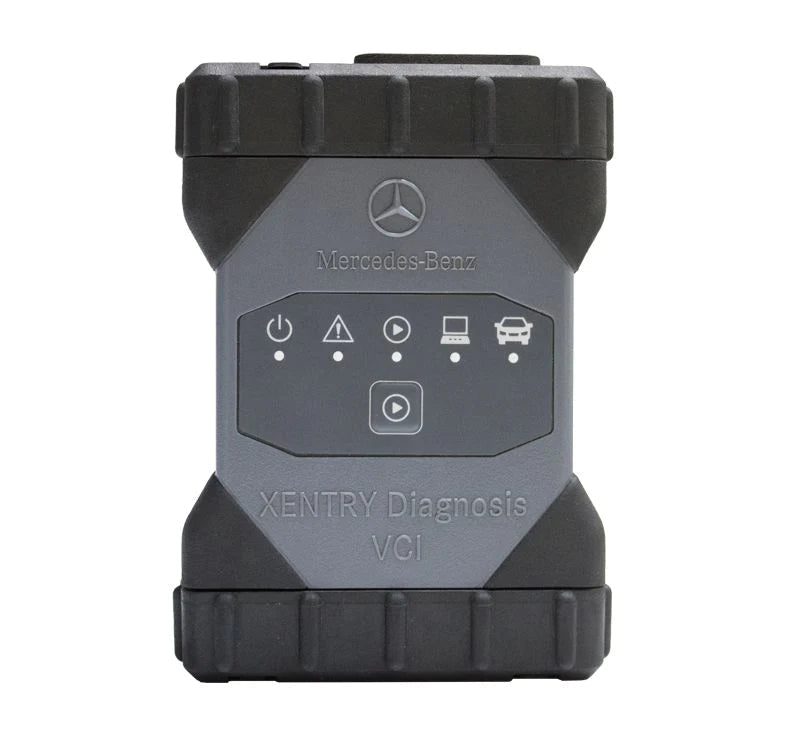
Click the image to view this diagnostic tool
Performance Red Flags: What Clone C6 Units Fail to Do
Even if a clone unit passes a casual physical inspection and activates in a modified version of Xentry, real-world performance will reveal the difference. Clone units consistently fail in specific areas that matter most to professional technicians and serious DIY users. Knowing these failure patterns helps you evaluate a unit after purchase and make a return or replacement claim if necessary.
DoIP Communication Stability
The mb star c6 doip protocol support is one of the defining features of this interface generation. Genuine units maintain stable Ethernet-based communication with the vehicle's gateway module throughout long diagnostic sessions, including during ECU coding and programming operations that can take 20 minutes or more. Clone units frequently drop the DoIP connection mid-session, which can leave an ECU in an incomplete programming state — a situation that can be expensive and time-consuming to recover from. If you are testing a unit and notice frequent disconnections, timeout errors, or the need to restart the session repeatedly, DoIP instability is the most likely cause.
ECU Programming and Coding Reliability
Reading fault codes is a relatively low-demand task that even some clone units can handle adequately. The real test comes when you attempt ECU programming, SCN coding, or variant coding operations. These functions require sustained, error-free communication and precise timing. Clone units with lower-quality internal components often fail at this stage, either producing errors during the coding process or completing the operation in a way that leaves the ECU in an inconsistent state. For workshops that regularly perform these operations, a clone unit is not just unreliable — it is a liability.
Protocol Coverage Gaps
Genuine MB Star C6 units are designed to handle the full range of Mercedes diagnostic protocols, from older K-line and CAN bus communication to current DoIP. Clone units often have gaps in their protocol support that only become apparent when you connect to a specific vehicle or module. A technician might find that the tool works fine on a common passenger car but fails on a Sprinter van, an older SL-class, or a vehicle with a specific control unit configuration. Before relying on any unit for workshop use, confirm its protocol coverage against the specific vehicles in your service bay.
At GETOBDTOOL, we help technicians, workshops, and DIY users choose reliable automotive diagnostic tools for real repair workflows. If you are evaluating MB Star C6 options and want to compare genuine unit specifications, update support, and workflow fit before committing to a purchase, our team can help you work through the decision based on your specific vehicle coverage needs and daily use requirements.
Where to Buy a Genuine MB Star C6 and What Warranty to Expect
Knowing how to identify a genuine unit is only half the equation. Knowing where to buy one — and what purchase protections to expect — is equally important. The source of your MB Star C6 purchase has a direct impact on the likelihood of receiving a genuine unit, the quality of after-sale support, and your options if something goes wrong.
Evaluating Suppliers Before Purchase
Start by looking at how long the supplier has been operating and whether they specialize in professional automotive diagnostic tools. A supplier who carries a broad range of diagnostic equipment, can answer detailed technical questions about the mb star c6 xentry integration, and provides clear information about what is included in the package is more likely to be a legitimate source than a general marketplace seller with limited product knowledge. Ask specifically about the unit's firmware version, whether it supports DoIP, what software version it ships with, and how firmware updates are handled. A supplier who cannot answer these questions confidently is not a supplier you should trust with a significant tool purchase.
Warranty and Return Policy
A genuine MB Star C6 original unit should come with a meaningful warranty period. Before purchasing, confirm the warranty duration, what it covers, and how warranty claims are handled. Does the supplier offer replacement units, repair service, or refunds? What is the process if the unit fails to activate in Xentry or shows performance issues within the first few weeks? Suppliers who offer clear, written warranty terms and a straightforward return process are demonstrating confidence in the quality of what they are selling. Vague warranty language or policies that require you to prove a defect before any support is offered are warning signs.
Package Contents and What Should Be Included
Confirm exactly what is included in the package before purchasing. A complete genuine MB Star C6 package typically includes the VCI unit itself, the necessary cables for OBD2 connection. Some packages include additional adapters for specific Mercedes connector types. If a listing does not clearly specify what cables and adapters are included, ask before purchasing — missing components can affect which vehicles and operations the tool supports out of the box. Also confirm whether software is included or needs to be sourced separately, and if software is included, verify that it is a licensed version rather than a modified or cracked installation.

Post-Purchase Verification Steps
When your unit arrives, do not wait to verify it. Connect it to your diagnostic computer, run a basic connection test on a known vehicle before relying on it for any critical work. If anything does not match — serial numbers, activation behavior, or connection stability — contact the supplier immediately while you are still within the return window. Document everything with photos and screenshots, as this will support any warranty or return claim.
From our experience working with technicians, repair shops, and vehicle owners across our target markets, the buyers who have the best outcomes are those who treat the purchase of a professional diagnostic tool with the same diligence they would apply to any significant workshop investment. Checking supplier credentials, asking detailed pre-purchase questions, and verifying the unit immediately on arrival are habits that consistently separate confident buyers from those who end up with a clone unit and no recourse.

Click the image to view this diagnostic tool
Frequently Asked Questions
How can I tell if my MB Star C6 is original just by looking at it?
Physical inspection is a useful starting point but not a definitive test on its own, since high-quality clones can closely mimic the appearance of genuine units. Focus on build quality details that are harder to fake: the consistency of seam lines between housing panels, the quality and alignment of connector pins, the print quality of serial number labels, and the overall weight and rigidity of the housing. If the unit feels lightweight, has uneven seams, or has a serial number label that looks inconsistent in font or spacing, treat those as warning signs. Always follow up physical inspection with software-side verification by checking the serial number in Xentry and confirming that the unit activates without errors.
Will a clone MB Star C6 work with Xentry software?
Some clone units are configured to work with modified or cracked versions of Xentry, and they may appear to function for basic fault code reading. However, clone units typically fail in more demanding scenarios — ECU programming, SCN coding, DoIP communication on newer vehicles, and software updates. More importantly, using modified Xentry software carries its own risks, including software instability and the inability to receive legitimate updates. A genuine mb star c6 original unit is designed to work with properly licensed Xentry software and should activate and update without requiring workarounds or unofficial tools.
What is the difference between the MB Star C6 and the older C4 interface?
The MB Star C6 supports DoIP (Diagnostics over Internet Protocol), which is the communication standard used by newer Mercedes-Benz vehicles. The older C4 interface — sometimes called the genuine mercedes c4 in workshop discussions — used different communication protocols and does not support DoIP. This means the C4 cannot fully diagnose or program many current-generation Mercedes models that require Ethernet-based communication. The C6 also supports the full range of older protocols, making it backward compatible with vehicles that the C4 could handle. For workshops servicing a mix of older and newer Mercedes vehicles, the C6 is the more capable and future-proof choice.
What should I do if I suspect I have already purchased a clone unit?
Start by running the software-side verification steps described in this guide — connect the unit to Xentry and check whether the serial number validates correctly and whether activation completes without errors. If you encounter serial number mismatches, activation failures, or are told by the seller that you need to use a specific offline version of Xentry, document everything with screenshots and photos. Contact the seller immediately and reference your purchase agreement and any warranty terms. If the seller is unresponsive or refuses to address the issue, escalate through the payment platform you used, as most credit card providers and payment services offer buyer protection for items that do not match their description.
Does the MB Star C6 require an ongoing software subscription?
Software licensing and update policies for Xentry-based tools can vary depending on the supplier and the specific package purchased. Some packages include a period of software access or updates, while others may require separate arrangements for ongoing Xentry access. Before purchasing, ask the supplier specifically about what software is included, how long any included license or access period lasts, and what the process is for obtaining updates after that period. Do not assume that a one-time hardware purchase includes unlimited software updates — confirm the details in writing before completing your purchase. This is one of the most important pre-purchase questions to ask, and a supplier who cannot answer it clearly is not giving you the information you need to make an informed decision.
Making a Confident Purchase Decision for Your Workshop
Identifying a genuine mb star c6 original unit requires attention at every stage — from evaluating the supplier and asking the right pre-purchase questions, to inspecting the physical unit on arrival and verifying it through Xentry before putting it into service. Clone units have become sophisticated enough that no single check is sufficient on its own, but working through the physical, software, and performance verification steps outlined in this guide gives you a reliable framework for protecting your investment. The MB Star C6 is a capable tool when it is genuine, supporting the full range of Mercedes diagnostic workflows from basic fault reading to DoIP-based ECU programming on current-generation vehicles. Settling for a clone means accepting unreliable performance in exactly the situations where reliability matters most.
If you are comparing MB Star C6 options and want guidance on what to look for in terms of package contents, software support, and workflow fit for your specific vehicle coverage needs, our Mercedes Benz diagnostic tool collection is a practical place to start. Browse our selection of genuine diagnostic interfaces and OBD equipment to find the right tool for your workshop or DIY diagnostic setup. You may also find our Car Vehicle Diagnostic Tool Scanner: Buyer's Guide & Comparison useful for understanding how the MB Star C6 fits within the broader landscape of professional diagnostic tools.